Track jobs
Keep all active work in one place.
Job tracking software for service businesses
NoriTrack helps service teams organize active jobs, assign work and keep customers informed. Share a private status link so each customer can check progress in their browser.
Keep all active work in one place.
Assign work and make it clear who is handling each job.
Give every customer a private link to check the latest status.
Customers just open the link. Nothing to install.
For your team
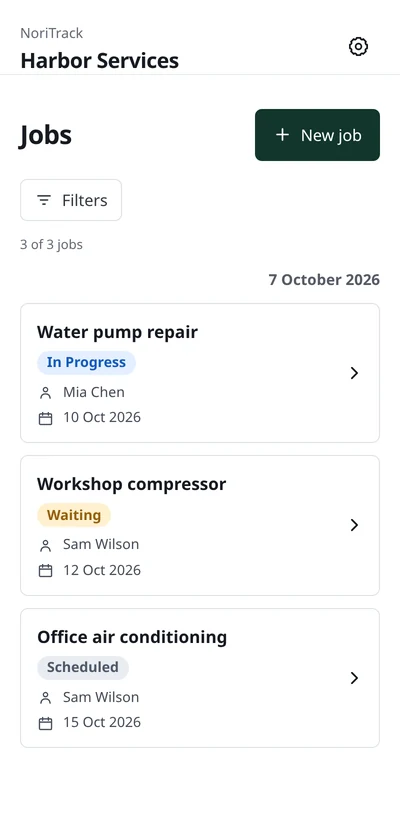
Keep service jobs in one place, with an assigned team member, a current status and an expected completion date. Open a job to see its details and history.
For your customers
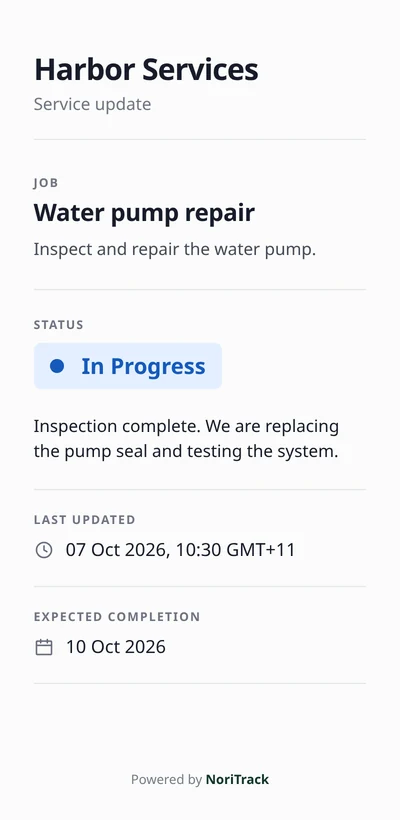
Share an individual link for a job. Your customer opens it in their browser to see the latest saved status and update, without creating an account or installing an app.
Three simple steps to keep your jobs on track.
Add the job details, choose a team member and set a completion date.
Change the status and add a short update as work progresses.
Send the private job link. Your customer opens it to see the latest saved update.
A few things to know before getting started.
No. Customers open their individual job link in a browser. They do not need to sign up, log in or install an app.
The page shows your company name, the job name and description, its current status, the latest status update, the last updated time and the expected completion date. Opening or reloading the page shows the latest saved information. It does not give access to your team’s workspace or other jobs.
Team members sign in to NoriTrack, open an assigned job, change its status and add a short update. Workers see the jobs assigned to them; owners and admins can manage jobs across the company.
Yes. Owners and admins can filter the Jobs page by any team member, including themselves, and by status. Filters can be combined and reset, and stay applied when you load more results.
Yes. An owner or admin can revoke a job’s customer link and generate a new one. The previous link stops working, so share the replacement with the customer.
Use Request a demo or email nori@noritrack.com. Include your company, country and type of business so we can discuss how NoriTrack fits the way your team works.
NoriTrack doesn’t replace the way you receive jobs, talk to customers or run your accounting. It gives ongoing work one simple place to live.